
Automation
Everything the dashboard does, every bit of it scriptable
A REST API that gets every feature first, a CLI that wraps it one to one, and scheduled commands for the jobs that run themselves. The dashboard is just the part with buttons.
Included at every tier. No automation add-on, no per-call pricing.
Three ways in, one arena
REST API
Documented, stable, first
Every dashboard action is an endpoint. New features land here first, then get a screen.
sinc CLI
The API from your shell
Same auth, same objects as the dashboard, wrapped for your shell and your scripts.
Scheduled commands
Cron on your servers
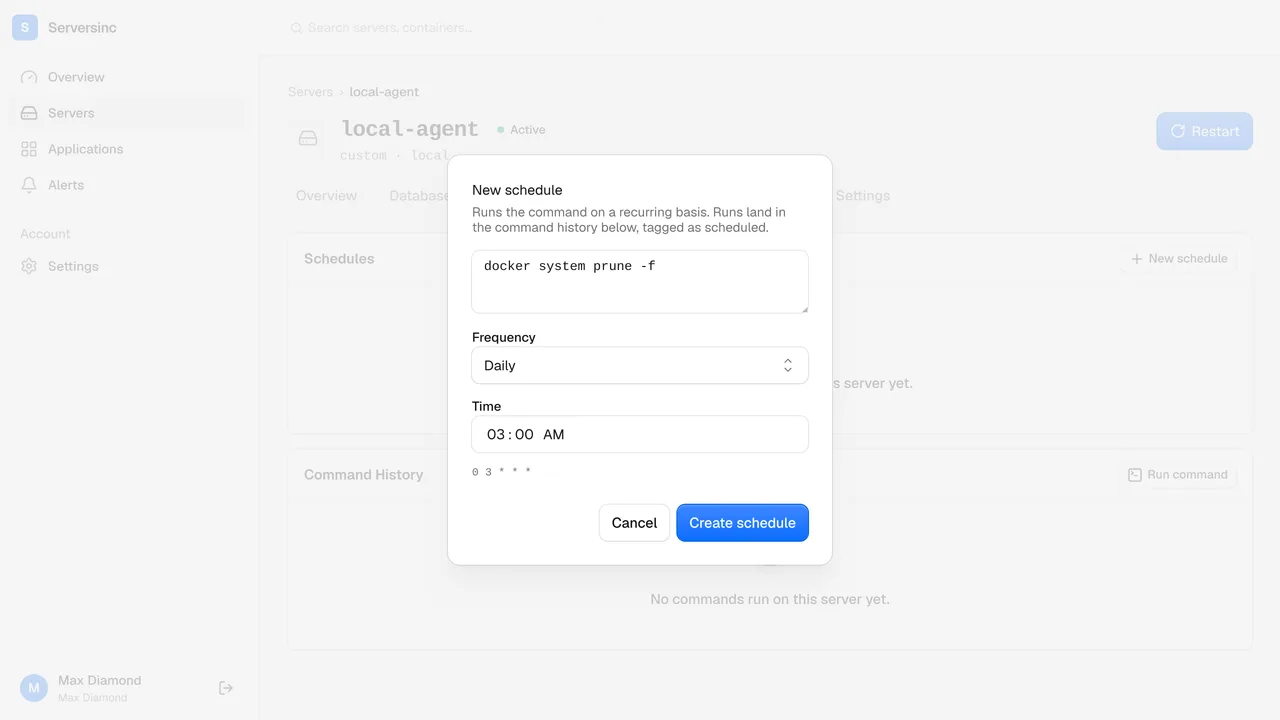
Run a shell command on a schedule. Output and full history kept, every run.
Tokens
Scoped API tokens
One token per script or pipeline. Burn one, the rest keep working.
Re-runnable
Deploys safe to repeat
Fire a deploy from CI on every push. Runs twice? Nothing breaks.
Audit trail
Who called what
Every API and CLI call is attributed, same as a click in the dashboard.
API
The API is the product. The dashboard is a client.
Serversinc is built API-first. Anything you can do in the dashboard is a documented call, and new features get an endpoint before they get a screen.
- Stable, versioned REST with predictable JSON
- Scoped tokens per script or pipeline, revocable one at a time
- Every endpoint public, documented and stable to build on
CLI
The same objects, from your shell
sinc authenticates once and drives the same servers, applications and deployments as the dashboard. Nothing second-class about the terminal.
- sinc servers, sinc deploy, sinc logs: the nouns match the dashboard
- Machine-readable output for scripts, readable output for you
- Drop it into CI to deploy on push without a webhook
Scheduled commands
Cron jobs with a record
Schedule a shell command on any server. Serversinc runs it, captures the output, and keeps every run on record. crontab never told you what happened.
- A cron expression per command, per server
- Output and exit status stored for every run, failures included
- Edit or pause a schedule from the dashboard or the API
Automation
Deploy on push, no webhook required
A token, one call, and CI redeploys on every merge. The CLI does the same in one line.
curl -X POST https://api.serversinc.io/v1/applications/$APP_ID/deployments \
  -H "Authorization: Bearer $SERVERSINC_TOKEN" \
  -H "Content-Type: application/json" \
-d '{ "strategy": "rolling" }'# .github/workflows/deploy.yml
- name: Deploy
run: sinc deploy ${{ vars.SERVERSINC_APP_ID }} --strategy rolling
env:
SERVERSINC_TOKEN: ${{ secrets.SERVERSINC_TOKEN }}Serversinc, or a pile of bash
What changes when the platform is API-first instead of UI-first.
| Feature | Traditional | Serversinc |
|---|---|---|
| Coverage | Automate whatever the UI happens to expose | Every action has an endpoint, screen or no screen |
| Auth | One shared key in every script | Scoped tokens, burned one at a time |
| New features | Wait for the API to catch up to the UI | The API gets it first, always |
| Scheduled work | crontab -e on each server, untracked | Scheduled commands, output and history kept |
| CI deploys | Webhook plumbing and a listener to maintain | One authenticated call, no listener to babysit |
FAQs
Automate your first deploy
Issue a token, drop one call into CI, and every merge ships itself. The docs have the full API reference and CLI guide.